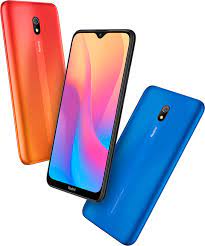
Xiaomi Redmi Note 8A Flash File (Firmware) Download Free
Download the official Xiaomi Redmi Note 8A Stock Firmware ROM (Flash File) for free. This flash file can help you fix issues like bootloop, stuck on logo, system crashes, IMEI issues, or software bugs. 100% tested firmware with step-by-step flashing guide using Mi Flash Tool and EDL/Test Point method.
📥 Download From: androidhub.co.in
🔧 Device Information
- Model Name: Redmi Note 8A (codename: olivelite)
- Display: 6.22-inch (720×1520 pixels)
- Processor: Qualcomm Snapdragon 439
- Rear Camera: 12MP
- Front Camera: 8MP
- RAM/Storage: 2GB/32GB
- Battery: 5000mAh
- Operating System: Android 9 (Pie), upgradable to Android 10
- MIUI Version: MIUI 10 / 11 / 12.5
📁 Available Flash Files (Fastboot ROMs)
| Firmware Version | Region | Android | MIUI | Download |
|---|---|---|---|---|
| V12.5.2.0.QCPMIXM | Global | 10.0 | MIUI 12.5 | ✅ |
| V12.5.2.0.QCPINXM | India | 10.0 | MIUI 12.5 | ✅ |
| V12.0.3.0.QCPINXM | India | 10.0 | MIUI 12 | ✅ |
| V11.0.7.0.PCPMIXM | Global | 9.0 | MIUI 11 | ✅ |
| V11.0.9.0.PCPINXM | India | 9.0 | MIUI 11 | ✅ |
| V10.3.1.0.PCPINXM | India | 9.0 | MIUI 10 | ✅ |
- olivelite_global_images_V12.5.2.0.QCPMIXM_20211025.0000.00_10.0_global
- olivelite_in_global_images_V12.5.2.0.QCPINXM_20211010.0000.00_10.0_in
- olivelite_in_global_images_V12.0.3.0.QCPINXM_20210524.0000.00_10.0_in
- olivelite_global_images_V12.0.2.0.QCPMIXM_20210330.0000.00_10.0_global
- olivelite_global_images_V12.0.3.0.QCPMIXM_20210518.0000.00_10.0_global
- olivelite_global_images_V12.0.1.0.QCPMIXM_20210112.0000.00_10.0_global
- olivelite_in_global_images_V12.0.1.0.QCPINXM_20210120.0000.00_10.0_in
- olivelite_global_images_V11.0.3.0.QCPMIXM_20201212.0000.00_10.0_global
- olivelite_in_global_images_V11.0.2.0.QCPINXM_20201028.0000.00_10.0_in
- olivelite_global_images_V11.0.2.0.QCPMIXM_20200925.0000.00_10.0_global
- olivelite_in_global_images_V11.0.1.0.QCPINXM_20200811.0000.00_10.0_in
- olivelite_global_images_V11.0.1.0.QCPMIXM_20200730.0000.00_10.0_global
- olivelite_global_images_V11.0.7.0.PCPMIXM_20200530.0000.00_9.0_global
- olivelite_in_global_images_V11.0.9.0.PCPINXM_20200530.0000.00_9.0_in
- olivelite_in_global_images_V11.0.8.0.PCPINXM_20200403.0000.00_9.0_in| Miui 11
- olivelite_global_images_V11.0.6.0.PCPMIXM_20200331.0000.00_9.0_global| Miui 11
- olivelite_global_images_V11.0.3.0.PCPMIXM_20191219.0000.00_9.0_global | Miui 11
- olivelite_in_global_images_V11.0.1.0.PCPINXM_20191105.0000.00_9.0_in | Miui 11
- olivelite_in_global_images_V10.3.1.0.PCPINXM_20190911.0000.00_9.0
(All files are official, tested, and free to download. No password required.)
🔄 How to Flash Redmi Note 8A (olivelite)
Requirements:
- A Windows PC
- Mi Flash Tool
- Qualcomm USB Drivers
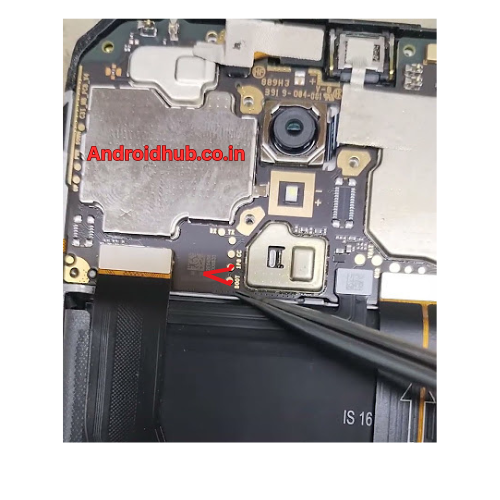
- EDL/Test Point Method (Image below)
- USB Cable
Steps:
- Download and extract the Redmi Note 8A Flash File.
- Install Qualcomm Drivers and Mi Flash Tool on your PC.
- Power off your device and short the EDL/Test Points (see image).
- Connect your phone to PC via USB while holding Test Points.
- Open Mi Flash Tool, click Refresh to detect your device.
- Load the extracted firmware folder.
- Click Flash and wait for the process to complete.
- Device will reboot automatically after successful flash.
📌 Note: Always take a full backup before flashing. Flashing will erase all user data.
🧠 Why Flash Your Redmi Note 8A?
- Fix Bootloop or Stuck on Logo
- Bypass FRP Lock
- Remove Virus or Lag
- Restore to Stock Firmware
- Repair IMEI or Baseband Issues
📸 EDL / Test Point Image
🚨 Disclaimer
Flashing firmware is risky and may void your warranty. We recommend this guide only for advanced users or technicians. Follow instructions carefully and proceed at your own risk. AndroidHub.co.in is not responsible for any damage caused.