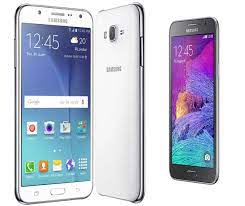
Download the official Samsung Galaxy J7 SM-J700F stock firmware and install it to restore your phone to factory condition. Flashing the stock ROM can fix issues like bootloop, stuck on Samsung logo, software crashes, or system errors.
All firmware files listed here are original Samsung firmware and available for free download on androidhub.co.in.
📥 Firmware Details
- Device: Samsung Galaxy J7
- Model Number: SM-J700F
- Android Version: Android 5.1 Lollipop
- Firmware Type: Official Samsung Stock ROM
- Region: India (INS)
📂 Download Samsung Galaxy J7 SM-J700F Firmware
U1 Firmware
U3 Firmware
U4 Firmware
These firmware packages allow you to update, repair, or reinstall Android Lollipop on the Galaxy J7 SM-J700F.
🧰 Required Flash Tool
To flash the firmware on your device, you will need:
- Odin
- Samsung USB Driver for Mobile Phones
- Windows PC
- USB cable
⚠ Problems Fixed After Flashing
Installing the official firmware can resolve many software issues such as:
- Stuck on Samsung logo
- Bootloop problem
- Phone not turning on
- System lag or freezing
- Software crashes or bugs
- Virus or malware infection
- Restore device to original Samsung firmware
🔧 How to Flash Samsung Galaxy J7 SM-J700F
Follow these steps carefully to install the firmware.
Step 1: Install Samsung Drivers
Install Samsung USB drivers on your computer so the device can be detected.
Step 2: Extract Firmware
Download the firmware ZIP file and extract it on your PC.
You should see a .tar.md5 firmware file.
Step 3: Boot Phone into Download Mode
- Turn off the phone.
- Press and hold Volume Down + Home + Power.
- When the warning screen appears, press Volume Up.
Your phone will enter Download Mode.
Step 4: Open Odin Tool
- Run the Odin Flash Tool on your computer.
- Connect your phone using a USB cable.
- Odin will detect the device and show a COM port.
Step 5: Load Firmware
- Click AP / PDA in Odin.
- Select the extracted .tar.md5 firmware file.
Step 6: Start Flashing
- Click Start in Odin.
- Wait until the flashing process finishes.
Once completed, Odin will display PASS and the phone will reboot automatically.
📱 Samsung Galaxy J7 SM-J700F Specifications
- Display: 5.5-inch Super AMOLED
- Processor: Exynos 7580 Octa-core
- RAM: 1.5 GB
- Storage: 16 GB (expandable via microSD)
- Rear Camera: 13 MP
- Front Camera: 5 MP
- Battery: 3000 mAh
- Operating System: Android 5.1 Lollipop (Upgradable)
✅ Conclusion
The Samsung Galaxy J7 SM-J700F is a reliable Android smartphone, but like any device it may face software issues over time. Flashing the official firmware using Odin can help fix bootloop problems, remove bugs, and restore the phone to its original state.