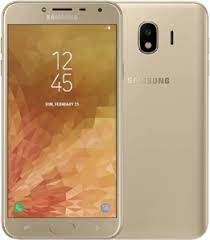
If you are looking for the Samsung Galaxy J4 SM-J400F firmware (flash file), you are in the right place. On androidhub.co.in, you can download the latest official Samsung stock firmware for the Galaxy J4 with fast and free download options.
All firmware files available here are official Samsung ROMs designed for the Samsung Galaxy J4 with model number SM-J400F, commonly used in India and other regions. Installing the stock firmware can help you fix boot loop problems, unbrick your device, remove system bugs, or restore your phone to its factory software.
Samsung Galaxy J4 Device Information
- Device Name: Samsung Galaxy J4
- Model Number: SM-J400F
- Android Version: Android 8.0 / Android 9.0 (varies by firmware)
- Processor: Exynos 7570 Quad-Core
- Display: 5.5-inch Super AMOLED
- Firmware Type: Stock ROM / Flash File
- Flash Tool: Odin Flash Tool
- Region: India (INS)
Samsung Galaxy J4 SM-J400F Firmware Download
Below are available official firmware versions for Samsung Galaxy J4 SM-J400F.
U6 Firmware
| Firmware Version | Android Version | Download |
|---|---|---|
| J400FXXS6BTF7 | Android 9 | Download |
U5 Firmware
| Firmware Version | Android Version | Download |
|---|---|---|
| J400FXXS5BTA2 | Android 9 | Download |
U4 Firmware
U3 Firmware
| Firmware Version | Android Version | Download |
|---|---|---|
| J400FXXU3BSDE | Android 9 | Download |
U2 Firmware
| Firmware Version | Android Version | Download |
|---|---|---|
| J400FXXU2ASA2 (January 2019) | Android 9 | Download |
These firmware packages contain the complete Samsung stock ROM required to flash your device using Odin.
Why Install Samsung Galaxy J4 Firmware?
Installing official firmware can solve many software issues such as:
- Fix boot loop problems
- Repair soft-bricked devices
- Restore factory stock ROM
- Fix device stuck on Samsung logo
- Remove system bugs or malware
- Improve device performance and stability
Flashing stock firmware is the best way to restore your Samsung Galaxy smartphone to its original working condition.
How to Install Galaxy J4 SM-J400F Firmware
Follow these steps to flash firmware on your Samsung device:
- Download the SM-J400F firmware file from androidhub.co.in
- Extract the firmware ZIP file on your computer
- Install Samsung USB Drivers on your PC
- Download and open Odin Flash Tool
- Boot your phone into Download Mode
- Connect your phone to your PC using a USB cable
- Load firmware files into Odin (BL, AP, CP, CSC)
- Click Start to begin the flashing process
After the flashing process finishes, your device will restart automatically.
Important Notes
- Always verify your device model is SM-J400F before flashing firmware.
- Installing incorrect firmware may damage your smartphone.
- Make sure your phone battery is above 50% before starting the flashing process.
About AndroidHub
androidhub.co.in provides Samsung firmware downloads, stock ROMs, flash files, and Android updates for many Samsung Galaxy devices. We offer safe, fast, and reliable firmware downloads to help users repair, update, or restore their smartphones.