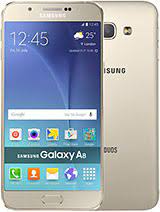
Samsung Galaxy A8 SM-A800I INS Firmware (Flash File) Download – Free & Official
Looking to restore or upgrade your Samsung Galaxy A8 SM-A800I? Download the official stock firmware for the Indian variant (INS region) to fix bootloop, upgrade Android, or recover from software issues using Odin Flash Tool.
💡 Free, Fast & Secure Download – No registration required
📥 Samsung SM-A800I Flash File Download Links
- 🔹 Firmware Version A800IODD2BQE1 (INS)
📁 Download A800IODD2BQE1_INS.zip - 🔹 Firmware Version A800IXXU2BRA2
📁 Download SM-A800I_A800IXXU2BRA2.zip
📁 Format: ZIP (Extract before flashing)
🛠️ Flash Tool: Odin3
📍 Country/Region: India (INS)
📅 Last Updated: 2018
📱 Samsung Galaxy A8 SM-A800I – Device Specs
- Model: SM-A800I (Galaxy A8 – India)
- Processor: Octa-Core (1.8GHz + 1.3GHz Cortex-A53)
- RAM: 2GB
- Storage: 32GB (Expandable up to 128GB)
- SIM: Dual Nano-SIM (GSM + GSM)
- Battery: 3050mAh Li-ion
- Display: 5.7-inch Super AMOLED
🚀 Elevating Your Experience: Samsung Galaxy A8 SM-A800I Software Highlights
1. 🌐 One UI – Intuitive Navigation
Samsung’s One UI brings a refreshed user interface with smoother transitions, minimal distractions, and effortless interaction.
2. 📸 Advanced Camera Features
The stock camera app includes Pro Mode, Panorama, HDR, and various filters—making it easy to capture stunning photos on the go.
3. 🛡️ Samsung Knox Security
With Samsung Knox, your phone is protected by defense-grade security. Secure Folder keeps sensitive data private, even when sharing your phone.
4. 🗣️ Bixby Voice Assistant
Your built-in smart assistant, Bixby helps with reminders, quick searches, settings changes, and more—just by using your voice.
5. 🔄 Regular Software Updates
Stay protected and optimized with routine firmware updates, security patches, and system enhancements from Samsung.
6. 🪟 Smart Pop-Up View
Multitask efficiently with Smart Pop-Up View, allowing you to open multiple apps as floating windows.
7. ❤️ Samsung Health
Track your steps, monitor your sleep, manage stress, and improve wellness with the preloaded Samsung Health app.
🛠️ How to Flash Samsung SM-A800I Firmware
Follow these steps to safely flash the firmware using Odin Tool:
- Download & extract the firmware file (.zip).
- Install Samsung USB Drivers on your PC.
- Download and open the Odin Tool.
- Boot your Galaxy A8 into Download Mode (Hold Volume Down + Home + Power).
- Connect the device via USB.
- Load the
.tar.md5file into the AP slot in Odin. - Click Start and wait for completion (green PASS message).
⚠️ Backup recommended: Flashing firmware may erase user data.
🔄 When Should You Flash This Firmware?
- Fix bootloop, stuck-on-logo, or bricked device
- Restore phone to factory condition
- Unroot or remove custom ROM
- Install latest official update
- Resolve software glitches, lag, or bugs
⚠️ Disclaimer
This is the official stock ROM from Samsung, intended for recovery and maintenance. Use at your own risk. AndroidHub is not liable for any issues caused during flashing.